
A production-deployed restaurant reservation system built from the ground up, covering the full journey from guest booking to kitchen-ready table management, with automated email notifications and Stripe-powered prepayments.
Tech Stack
The booking starts here
A floating reservation widget that lives on the restaurant's own website. Guests pick a date, time, and party size, then choose a dining area and complete their booking, all without leaving the page. The blue trigger button sits fixed in the bottom-right corner and opens a compact three-step popover flow. A fullscreen mode lets restaurants link directly from Google Business Profile or social media bios without any embedding.
Live widget — click the blue button in the bottom-right corner to try it
The widget booking flow in action, from date selection through dining area choice to confirmation.
Widget booking flow recording
Architecture
The widget compiles to a single JS bundle via Vite 6 + SWC. Restaurants embed it with one <script> tag. It renders inside an iframe with postMessage communication between the host page and the widget. A keep-warm cron pings the Supabase edge function every 30 seconds to prevent cold starts.
Stack
| Layer | Technology |
|---|---|
| Frontend | React 18 + TypeScript |
| Styling | Tailwind CSS + shadcn/ui (Radix primitives) |
| Build | Vite 6 + SWC |
| Backend | Supabase Edge Function (Deno / Hono) |
| Auth | Supabase anon key (public, read-safe) |
Three-step flow
- Step 1, Booking: Custom calendar (7-column CSS grid, 3-month horizon). Time slots grouped by service, colour-coded by availability. Client-side party-size filtering avoids re-fetching on every guest count change. Closed days are greyed out with tooltip reasons.
- Step 2, Dining area: Cards with lazy-loaded images, live availability badges. Parallel
POST /check-availability-by-groupcalls per section. - Step 3, Checkout: Contact form with European phone validation (30 countries), multi-step email validation, terms acceptance. Waitlist path shows orange UI when tables are full.
Waitlist as first-class path
Fully booked slots don't block guests. A "Join Waitlist" button appears inline. Both paths use the same POST /reservations endpoint; the isWaitlist flag triggers amber UI, different confirmation copy, and backend waitlist processing.
Fullscreen mode
Appending ?fullscreen=true renders the widget as a centred full-page layout without the floating trigger button. Designed for direct links from Google Business Profile, social media bios, or QR codes on physical menus.
Large party overflow
When a guest count exceeds the restaurant's configured maximum, the widget replaces the booking flow with a contact prompt showing the restaurant's phone number and/or email. The overflow message is customisable per language (NL, EN, FR, DE).
Reservation limits
The widget detects when a restaurant has hit its monthly plan limit and displays a "Reservation limit reached" message, preventing overbooking.
Internationalisation
4 languages (NL, EN, FR, DE). All strings, including calendar names, error messages, and legal copy, are translated. Language selector in the popover header triggers full re-render.
Where staff manage the floor
The core application. A real-time reservation management system built for the browser first. A PWA manifest lets staff save it to their home screen for a native app feel on any device, with specific layout rules that keep it intuitive on tablet and mobile displays. Four view modes cover every workflow: a visual timeline, a guest list, a split view that combines both, and an interactive floor plan for spatial table management.
The app adapts to any screen. On desktop the split view shows the timeline and guest list side by side. On mobile the guest list collapses to a single-column layout staff can work from the floor.
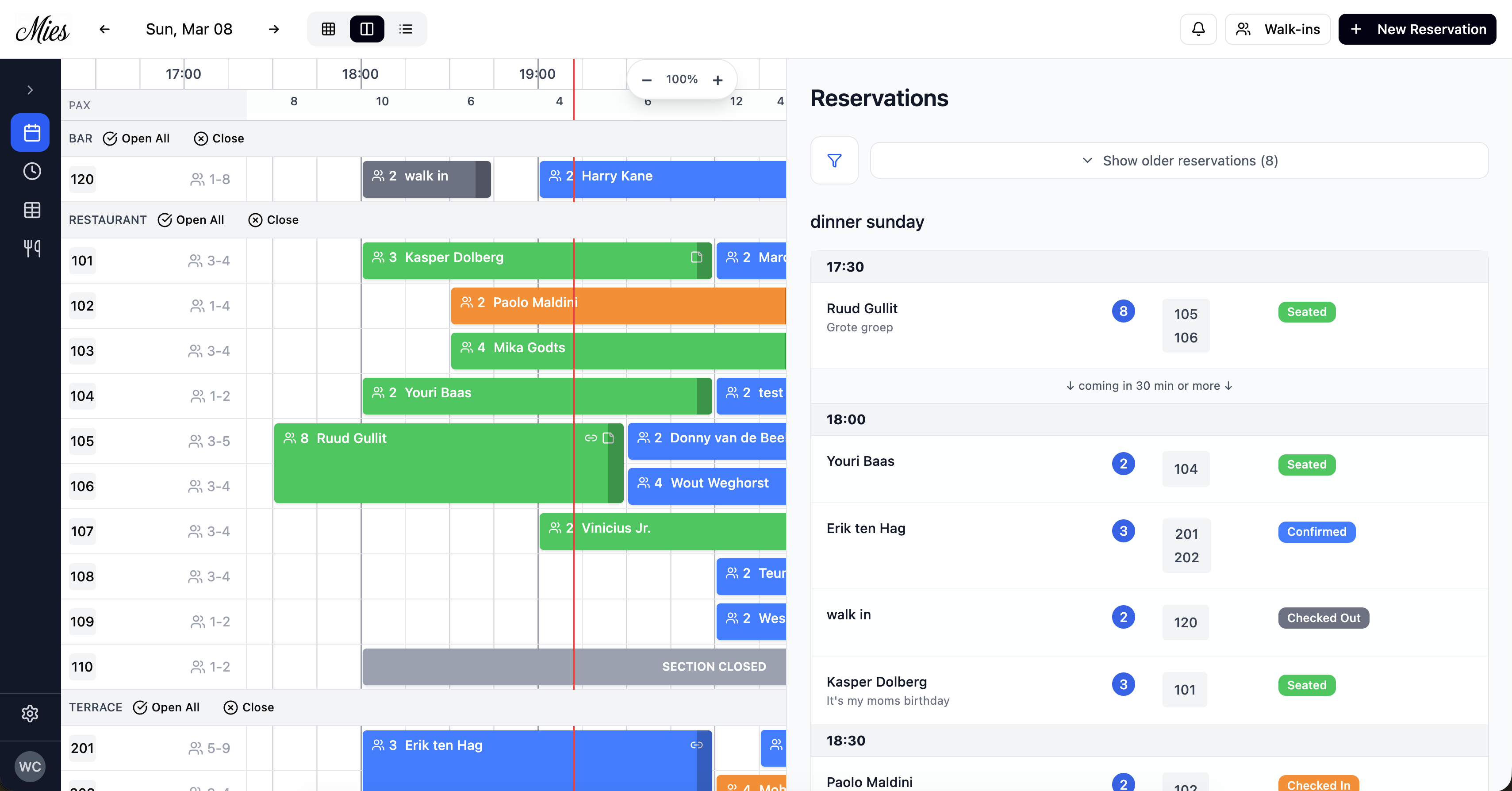
Split view. Timeline on the left, guest list on the right
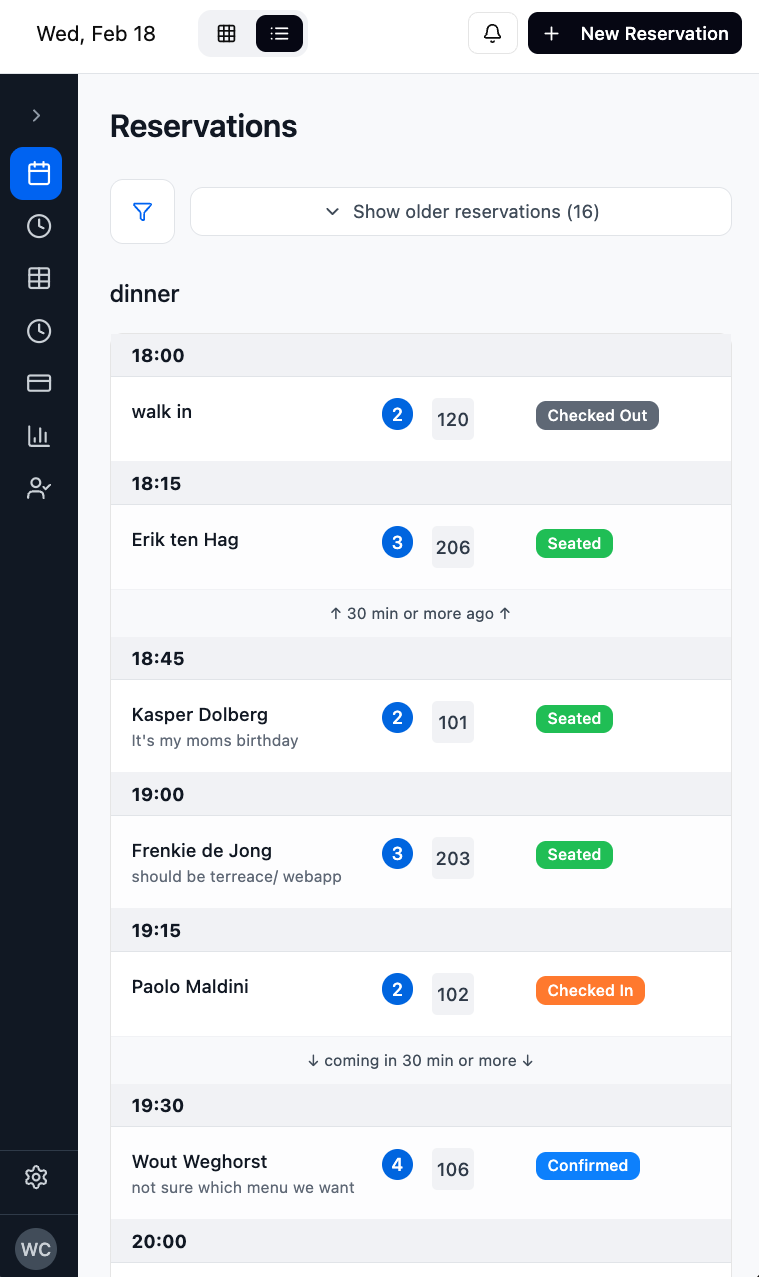
Guest list on mobile
Drag-and-drop on the timeline. Long-press a reservation block to pick it up and move it to a different table or time slot.
Drag-and-drop reservation rearrangement
Creating or editing a reservation opens a dialog with a visual time picker. Each slot shows how many seats are still available and is colour-coded by fill level. Overlap detection highlights conflicts in real time, and multiple tables can be merged into a single booking.
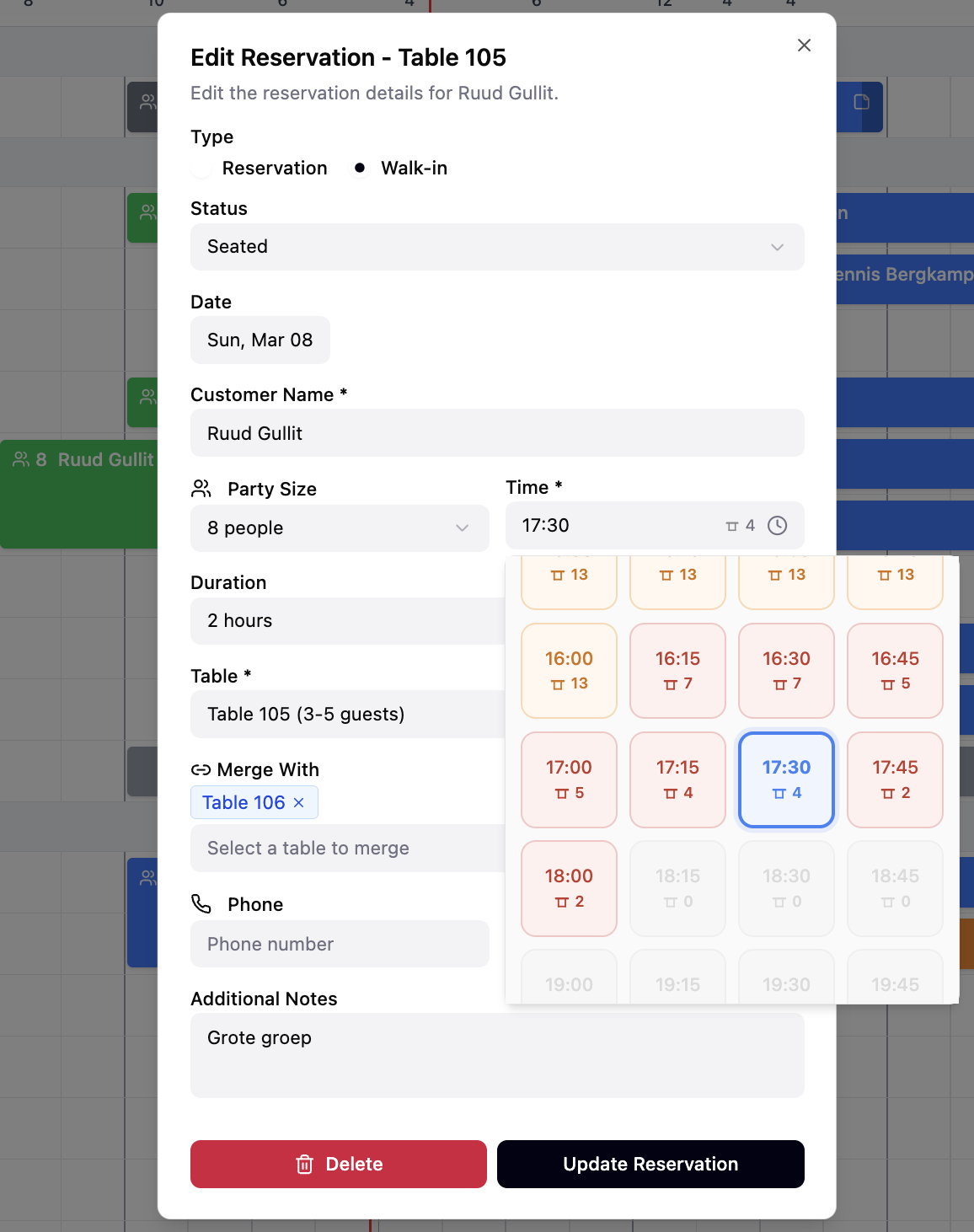
Reservation dialog. Slot availability, overlap detection, table merging
The floor plan view renders tables on a drag-and-drop canvas. Staff can reposition tables, cycle through shapes (circle, square, rectangle), resize them, and add decorative items like plants, doors, walls, and labels. Each table is colour-coded by its current reservation status, and hovering shows a tooltip with booking details.
The waitlist page shows all widget-made waitlist registrations with pax, preferred time, preferred section and notes or allergies. When a table becomes available and auto-assignment is turned on, the system auto-assigns the next guest in the FIFO queue.
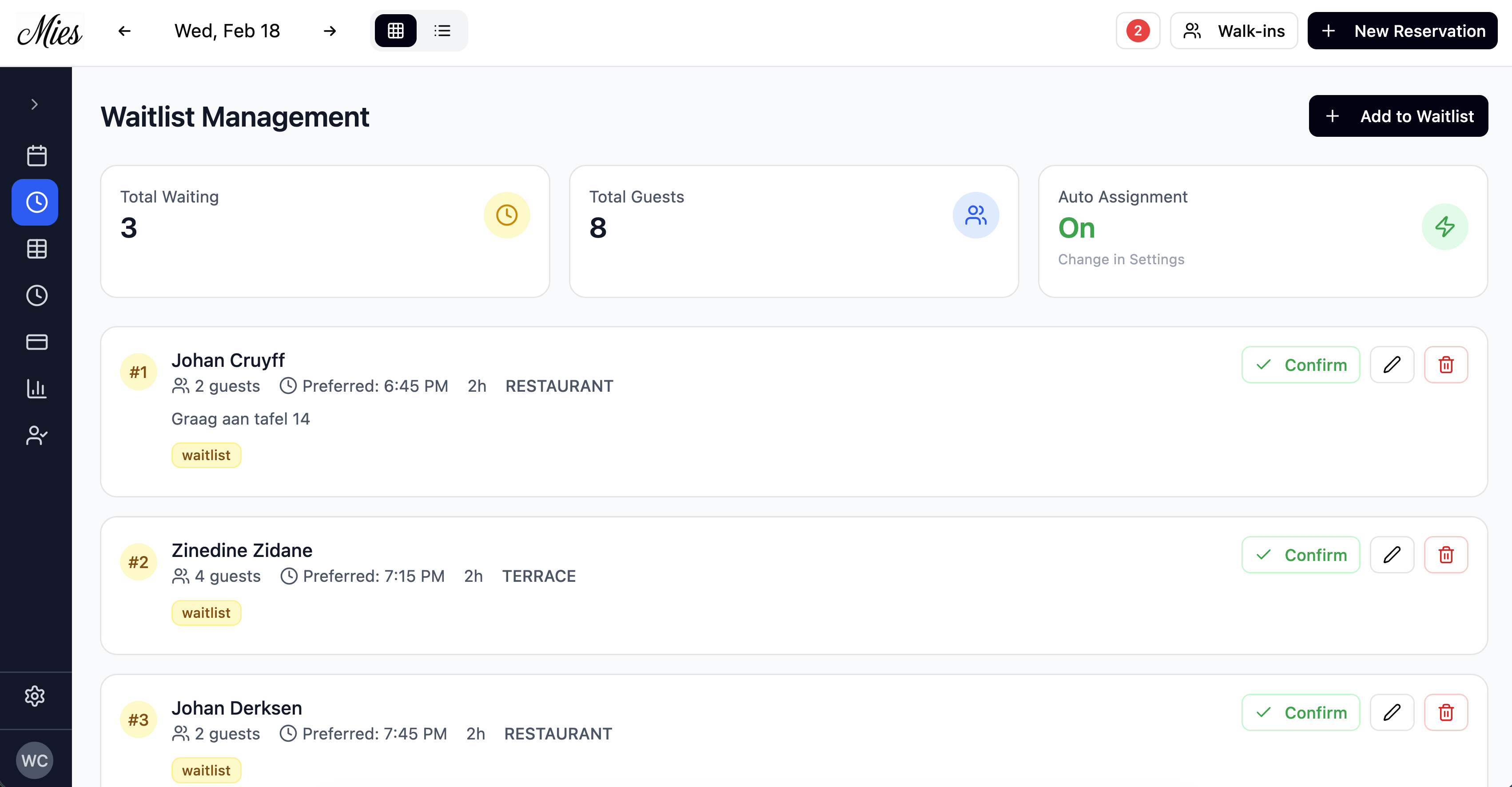
Waitlist management. FIFO queue with auto-assignment
When a waitlist entry gets promoted to a confirmed reservation, the flow is visible in real time.
Waitlist promotion: entry converts to confirmed reservation
Table management lets staff define sections, set names, and configure min/max capacities for each table on the floor.
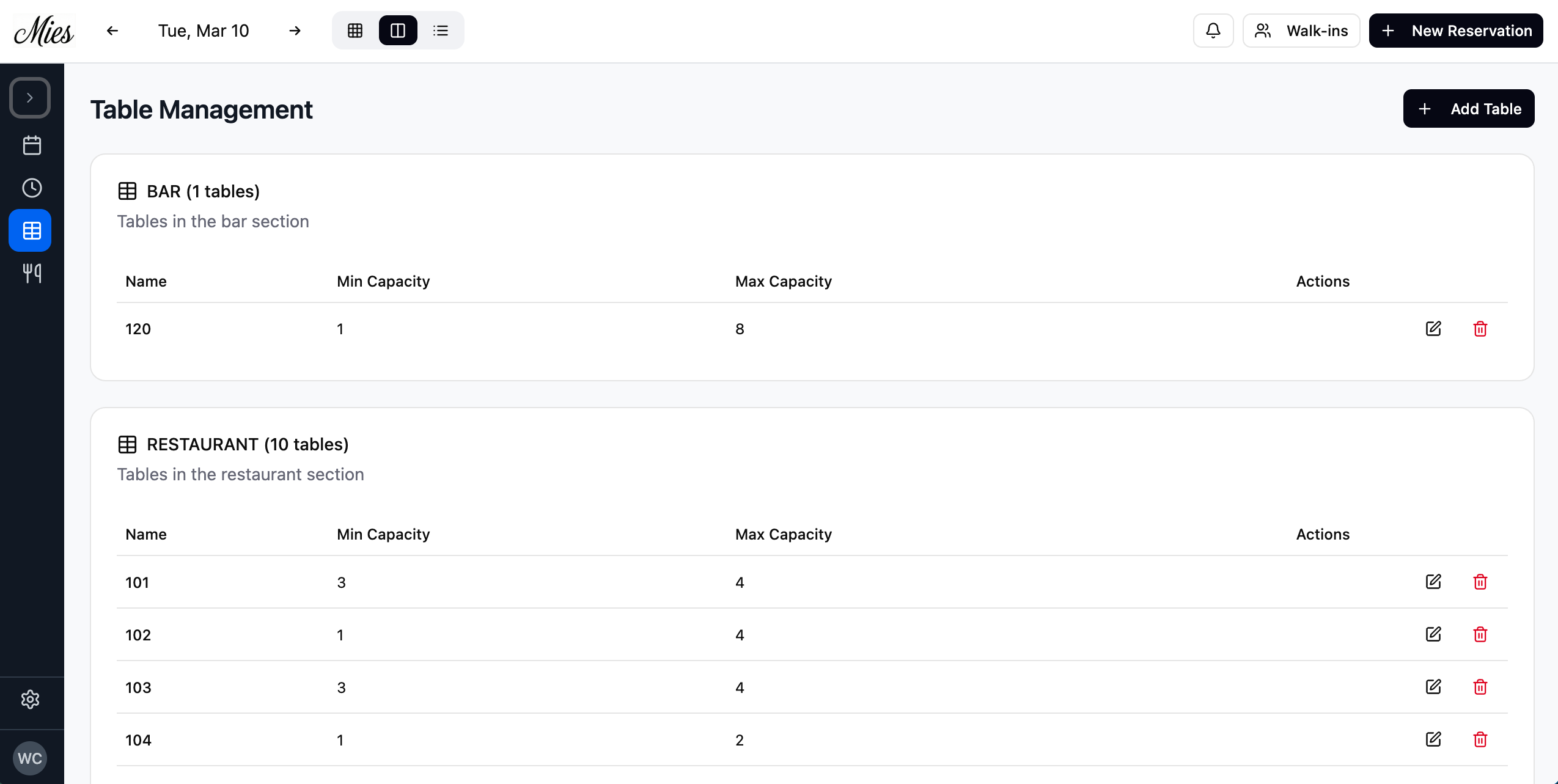
Table management. Sections, capacity, floor layout
Services define when the restaurant is open for bookings. Each service has a name, colour, and active days, displayed as a weekly schedule with colour-coded time blocks.
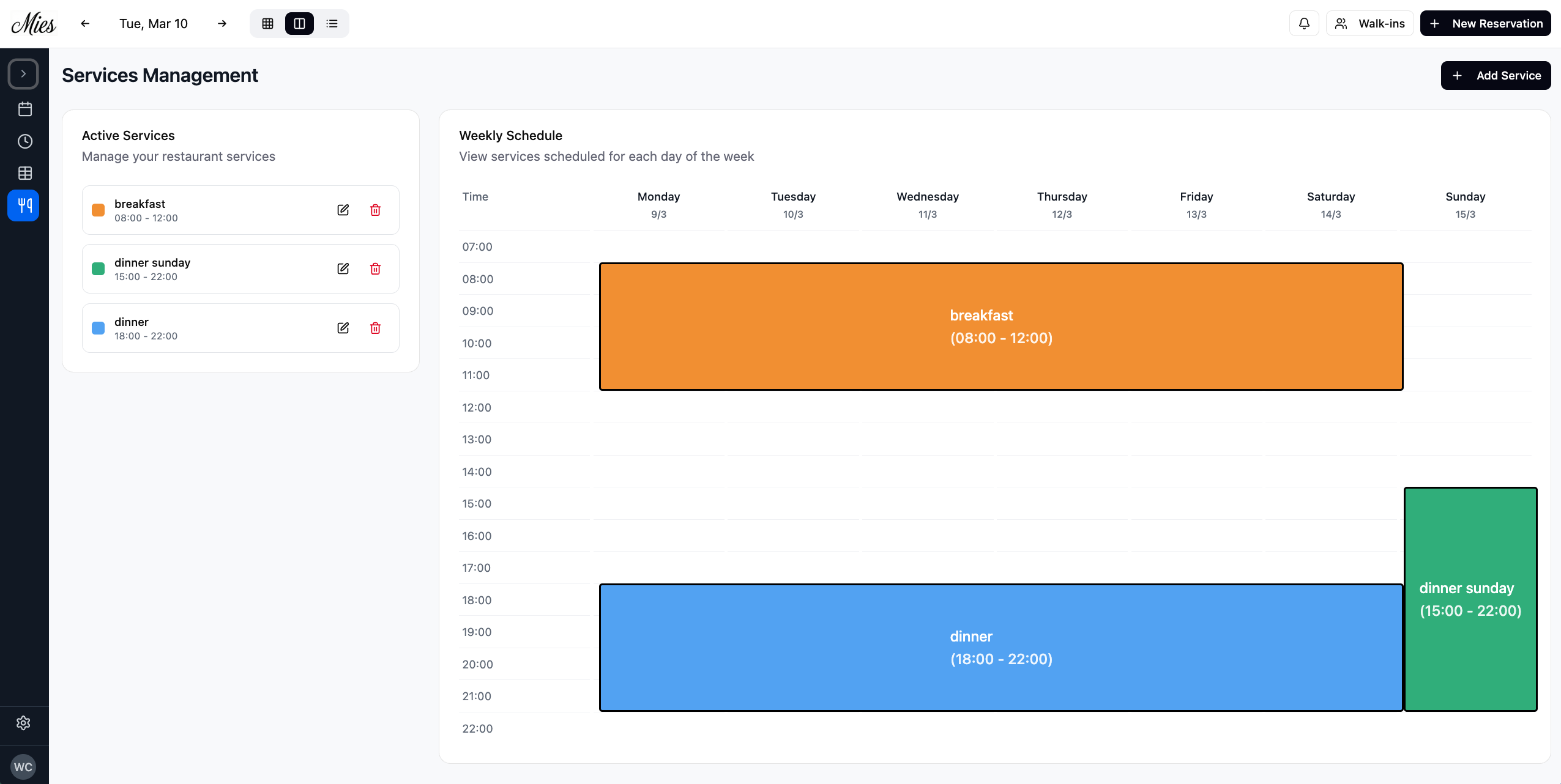
Weekly service schedule with colour-coded time blocks
Each service is configured with a name, hex colour, guest-facing description, start and end time, and which days of the week it runs. Within that window, a 15, 30, or 60-minute slot interval generates the bookable time grid — individual slots can be toggled on or off to block out peak hours or kitchen transitions. A default reservation duration sets how long each booking occupies a table, and a max capacity per timeslot prevents overbooking across the entire restaurant. Staff can also mark specific dates as closed with optional reasons, blocking all bookings for that day.
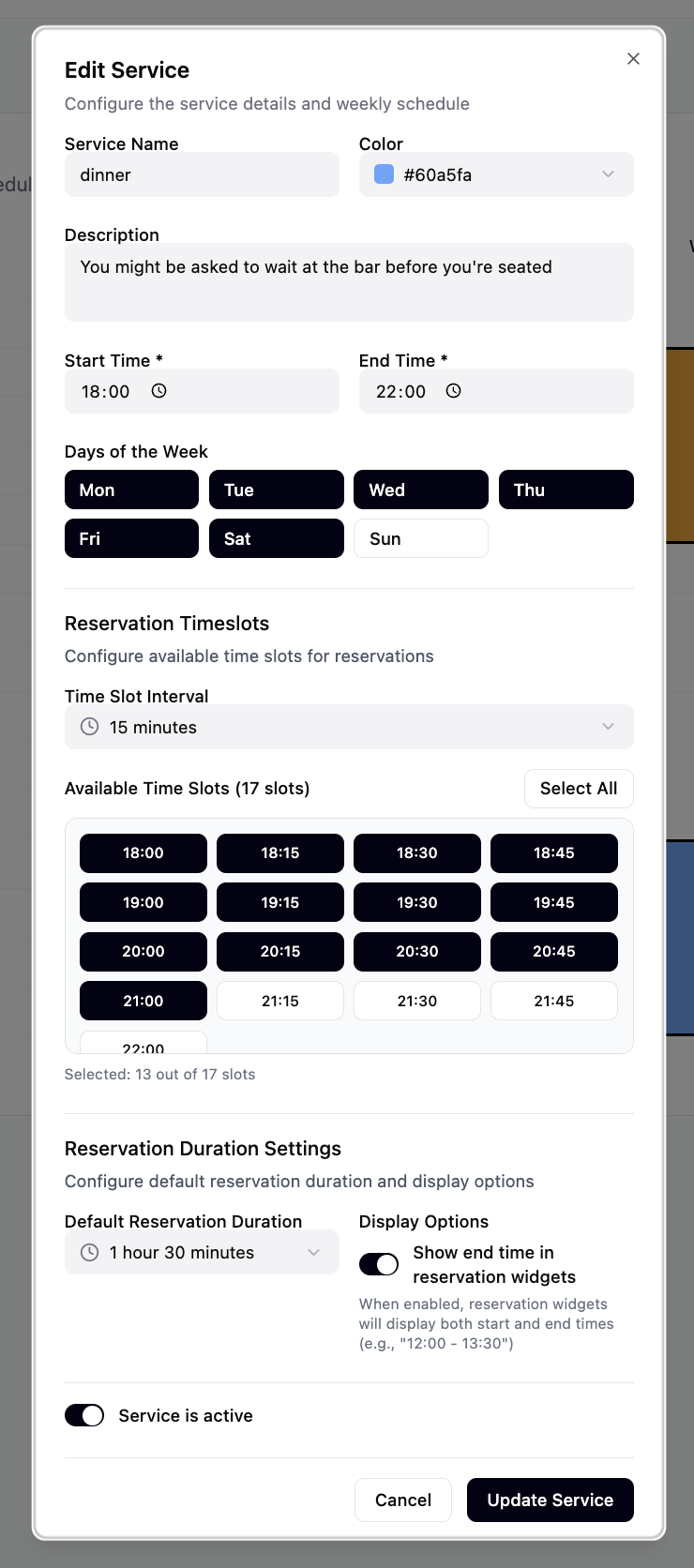
Service editor. Slots, intervals, active days
Stack
| Layer | Technology |
|---|---|
| Frontend | React 18 + TypeScript |
| Styling | Tailwind CSS + shadcn/ui (47+ primitives) |
| Build | Vite 6 |
| Backend | Supabase Edge Functions (Deno / Hono) |
| Database | Supabase PostgreSQL with RLS |
| Auth | Supabase Auth (email/password + Google OAuth) |
| Real-time | Supabase WebSocket subscriptions |
| i18n | react-i18next (English + Dutch) |
| Testing | Playwright (E2E) |
| Deployment | Vercel (frontend) + Supabase (backend) |
| Target | iPad (iOS PWA, standalone mode) |
Four view paradigm
- Timeline: 2D grid with time horizontal, tables vertical. 15-minute columns, sticky hour headers, current-time red line, PAX row, service zone backgrounds with blue boundary lines. Zoom from 50% to 400%.
- Split: Timeline left + guest list right. Only available above 1000px width.
- Guest list: Tabular rows grouped by service, sorted by time. Filters by table group and status, time-based collapsing for past reservations.
- Floor plan: Interactive canvas with draggable tables. Shapes cycle between circle, square, and rectangle. Decorative items (plants, doors, walls, bars, labels) can be placed for spatial context. Tables are colour-coded by reservation status. Hover tooltips show current bookings. Layout persists to both localStorage (instant load) and database (cross-device sync).
Drag & drop (long-press activated)
200ms long-press activates drag. Block scales 105% with haptic vibration. Ghost follows cursor at z-9999, blue dashed outline marks drop target. Snaps to 15-minute grid. Click suppression (200ms) prevents accidental dialog opens after drag.
Resize
4px handle appears on hover at the right edge of a reservation block. Long-press activates resize mode. Duration updates in real-time, snapped to 15-minute intervals.
Merged table spans
Tables in the same section can be merged for large parties. The reservation block renders as a tall span across multiple rows. Validation prevents simultaneous merges of the same table.
Optimistic updates
All mutations apply immediately to the UI with a temporary ID (prefixed temp-). On API success the temp ID swaps for the server ID. On failure, state rolls back and an error is shown. Temp reservations are excluded from overlap checks.
Real-time sync
Reservations poll every 5 seconds, tables every 60 seconds. A separate Supabase real-time subscription listens for INSERT events to trigger in-app notifications. Notifications, read status, and sent reminders are persisted in localStorage.
Reservation lifecycle
| Status | Colour | Meaning |
|---|---|---|
| Confirmed | Blue | Booked, not yet arrived |
| Checked in | Orange | Guest has arrived |
| Seated | Green | Guest at table |
| Checked out | Gray | Guest has left |
Waitlist processing
FIFO queue triggered when table availability changes (deletion, duration reduction, table reassignment, time change, or status downgrade). For each waitlist entry: match section preference, check capacity, verify no time conflict. Converts one entry per trigger to prevent overbooking. Respects the waitlistAutoAssign setting.
User codes (staff PIN access)
Restaurants can create 4-digit PIN codes for staff members with granular permissions. 19 permission flags control access to individual features: creating reservations, editing, cancelling, changing status, managing tables, services, finances, settings, and more. Codes default to disabled for new restaurants and can be toggled on when needed.
PWA on iPad
display: standaloneremoves Safari chromeuser-scalable=noprevents iOS zoom; replaced with UI zoom buttonsviewport-fit=coverextends into notch/home indicator- Touch interactions use
touchAction: 'none'to prevent scroll interference
Guests edit their own bookings
A standalone page guests reach through an email link. It lets them adjust party size, date, time, dining area, and contact details, no login required. Guests can also cancel their reservation entirely through a two-step confirmation dialog. The layout is mobile-first, with an inline calendar and real-time availability checks per time slot and section.
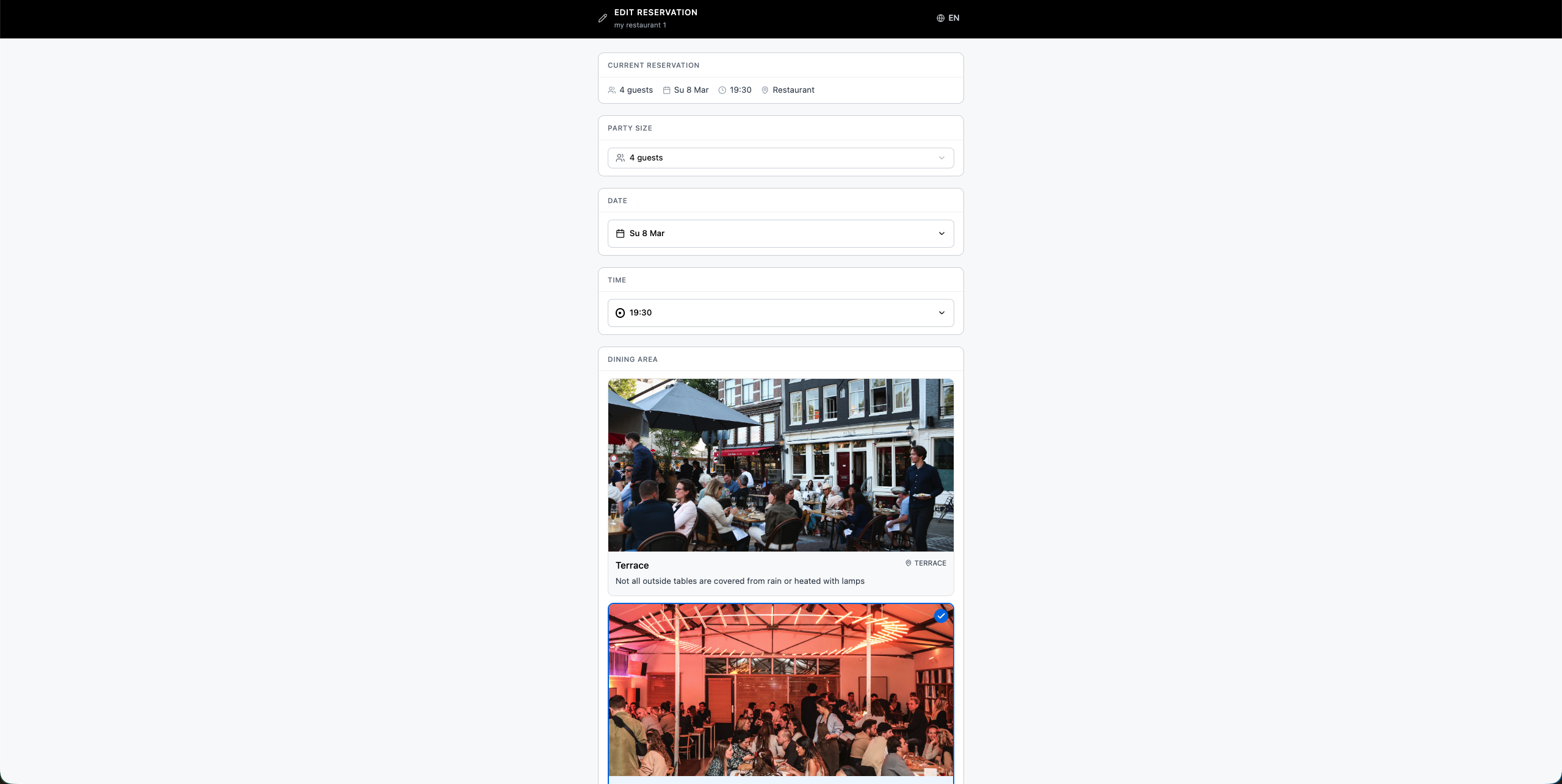
The reservation editor. Change summary at the bottom highlights modifications
Stack
| Layer | Technology |
|---|---|
| Frontend | React 19 + TypeScript |
| Styling | Tailwind CSS v4 + shadcn/ui |
| Build | Vite 6 |
| Backend | Supabase Edge Function (Deno) |
| Auth | Supabase anon key (no user login) |
| Target | Mobile-first responsive |
API routes
| Method | Endpoint | Purpose |
|---|---|---|
| GET | /reservation/:id | Load reservation + contact for editing |
| GET | /table-groups | List dining area sections with images |
| GET | /services/:date | Time slot groups for a given date |
| GET | /availability/:date | Per-slot section availability |
| PUT | /reservation/:id | Save changes + handle waitlist flag |
| DELETE | /reservation/:id/cancel | Cancel reservation (two-step confirmation) |
Design decisions
- All state local: Single component (
EditReservationPage.tsx, 1650 lines) holds all editable state. No global store, justified for a single-page flow. - Custom calendar: 120-line component using Date arithmetic with a 7-column CSS grid. Supports Dutch, English, German, and French month/day names. 3-month booking horizon. Closed days are greyed out.
- Client-side availability: Full per-date availability fetched once, filtered by time slot locally. Larger payload but avoids per-slot round-trips.
- Waitlist as UI mode: Selecting a dining area with no free tables triggers an amber "Register for waitlist" button. Same
PUTendpoint, backend decides handling. - Cancellation: Red "Cancel Reservation" button opens a two-step confirmation dialog. On success, displays a cancellation screen with strikethrough booking details.
- Date handling: Local
Datearithmetic only (new Date(year, month - 1, day)), nevernew Date(string)). Prevents UTC parse ambiguity for the CET timezone. - Phone validation: 30 European countries, real-time on keystroke. Deliberately avoids rigid regex to accept valid but unconventional formats.
Change summary
A diff view at the bottom shows what changed: strikethrough old values, bold new values. The submit button stays disabled when nothing has changed or the form is invalid.
Fifteen tables, twelve triggers, three edge functions
The backend runs on Supabase PostgreSQL with three separate Deno edge functions — one per product. What started as six tables has grown to fifteen as the platform matured, with twelve database triggers handling everything from tenant isolation to email denormalisation to reminder scheduling. A three-tier plan system (free, lite, pro) gates features at the application layer, and Stripe Connect powers prepayment collection for pro-tier restaurants.

Full database schema. 15 tables with RLS, triggers, and multi-tenant isolation
Core tables
reservations. Core booking data. 30+ columns includingstart_time(varchar HH:MM),duration(minutes),party_size, status lifecycle (confirmed → checked in → seated → checked out), waitlist fields,merged_table_ids(UUID array), and denormalised email settings (email_color,email_language,email_on_new,email_on_update,email_on_cancel,email_on_reminder).tables. Physical seating. Name, section, min/max capacity, section description.services. Shift definitions.daysandreservation_slotsas JSONB,slot_interval(15/30/60 min),default_duration,max_reservations_per_slot, colour.settings. Per-restaurant config (1:1). Widget settings, email toggles, notification preferences, Stripe Connect IDs, prepayment config, UI zoom, view preferences.user_profile. Accounts linked to Supabase Auth. Plan tier (free/lite/pro),activatedgate, restaurant name.
Feature tables
floor_plan_layouts. Per-table position, size, shape, and rotation on the floor plan canvas.floor_plan_items. Decorative elements (plants, doors, walls, bars, labels) with position and rotation.closed_days. Explicit restaurant closure dates with optional reasons.user_codes. 4-digit staff PINs with JSONB permission flags (19 granular permissions).prepayments. Stripe payment tracking: intent IDs, session IDs, status (pending/paid/refunded), amounts.n8n_bounce. Deduplication table for email webhook debouncing. Storesreservation_id,updated_at, and old field values.plan_limits. Feature gates per tier (tables, services, sections, monthly reservations, waitlist, prepayments).rate_limits. Monthly reservation counts per restaurant for plan enforcement.reservation_audit_logs. Full audit trail with action type, source, old/new values, changed fields.newsletter_subscribers. Standalone marketing table.
Triggers & functions (12+)
| Function | Purpose |
|---|---|
set_restaurant_id_on_insert() | Auto-sets restaurant_id on all data tables from user_profile or JWT metadata |
set_restaurant_name() | Denormalises restaurant name into reservations for self-contained webhook payloads |
set_email_color_on_insert() | Copies email colour from settings at reservation creation time |
set_email_language_on_insert() | Copies email language from settings at reservation creation time |
set_email_toggles_on_reservation() | Copies per-action email flags + owner BCC flags from settings |
set_show_end_time_on_insert() | Copies show_end_time from the active service |
reset_reminder_on_time_change() | Resets reminder_email_sent when start_time or date changes |
preserve_n8n_bounce_old_values() | Keeps first old values in the 5-minute dedup window |
increment_reservation_count() | Increments rate_limits counter on new reservations (skips waitlist) |
seed_new_restaurant() | Creates default service, 5 tables, and rate_limits row on signup |
send_reservation_reminders() | pg_cron function: finds reservations 50–70 min out, marks sent, fires pg_net to n8n |
get_current_user_restaurant_id() | Helper for Row Level Security policies |
Webhooks
- Reservation changes: AFTER INSERT/UPDATE/DELETE on
reservationsfires to n8n for email automation (confirmation, update, cancellation). - Account registrations: AFTER INSERT/UPDATE on
user_profilenotifies admin of new signups.
Plan system
| Feature | Free | Lite | Pro |
|---|---|---|---|
| Tables | 10 | Unlimited | Unlimited |
| Services | 1 | Unlimited | Unlimited |
| Sections | 1 | Unlimited | Unlimited |
| Reservations/month | 100 | Unlimited | Unlimited |
| Waitlist | — | — | Enabled |
| Prepayments | — | — | Enabled |
Edge function API
Three separate Deno edge functions, one per product. The staff app function (make-server-a33386f8, 2400+ lines) uses Hono and serves 20+ endpoints with JWT auth — two Supabase clients per request: service-role for admin operations and a user-scoped client for RLS enforcement. Includes Stripe Connect onboarding, audit log queries, floor plan sync, and user code management. The widget function uses Hono with open CORS and serves 6 public endpoints. The editor function (edit-server) serves 6 endpoints using the reservation ID as an implicit auth token. All three handle snake_case → camelCase translation.
Multi-tenancy
Every data table has a restaurant_id column. The set_restaurant_id_on_insert() trigger auto-populates it. The edge function creates a per-request Supabase client with the user's JWT. RLS policies use get_current_user_restaurant_id() to scope all queries.
Design choices
- No foreign keys: Simplifies multi-tenant management; referential integrity handled at the application layer.
- VARCHAR for times: Avoids timezone conversion between Deno, PostgreSQL, and the frontend.
- JSONB for arrays:
services.daysandreservation_slotsread/written as complete units. - Denormalised email fields: Settings are copied onto reservations at INSERT time via BEFORE INSERT triggers. This snapshots the restaurant's email preferences so that n8n webhook payloads are self-contained and settings changes don't retroactively affect in-flight emails.
- Settings upsert: Single row per restaurant with
ON CONFLICT (restaurant_id). - Audit via triggers:
reservation_audit_logspopulated automatically by PostgreSQL with full before/after snapshots.
Four emails, four languages, zero manual sends
Every reservation event triggers an automated email through n8n, a workflow automation platform connected to Supabase via database webhooks. Two n8n workflows handle four email types — confirmation, update, cancellation, and reminder — each translated into Dutch, English, German, and French. The restaurant's brand colour is injected into every template, and owners can optionally receive a BCC of every email sent to their guests.
Workflow 1: Reservation automation
A Supabase database webhook fires on every INSERT, UPDATE, or DELETE on the reservations table. The n8n workflow receives the webhook payload and routes it through a Switch node:
- INSERT: If
email_on_newis true, renders an HTML confirmation email with the restaurant's brand colour. For waitlist entries, the template switches to an amber header with waitlist-specific copy. - UPDATE: Two parallel branches. If start_time or party_size changed, the flow runs through a 5-minute dedup pattern (see below) then sends an update email with a "What Changed" section showing old → new values with strikethrough. If a waitlist entry was promoted to confirmed (is_waitlist flipped from true to false), sends a confirmation email.
- DELETE: If
email_on_cancelis true, sends a cancellation email with a dark header and strikethrough details.
Workflow 2: Reminder emails
A pg_cron job runs every 10 minutes inside PostgreSQL. The SQL function send_reservation_reminders() finds reservations 50–70 minutes from now, atomically marks them as sent (reminder_email_sent = true), and fires a pg_net HTTP POST to n8n with a batch payload. The n8n workflow splits the batch into individual items and sends each a "Your reservation is coming up in about 1 hour" email.
Bounce / dedup pattern
When a staff member rapidly edits a reservation (e.g. changes time, then party size within seconds), each edit fires a separate webhook. Without dedup, the guest would receive multiple update emails. The solution:
- POST upserts a row in the
n8n_bouncetable withreservation_id+ current timestamp + old field values. - Wait 5 minutes — pauses the n8n execution.
- GET queries the bounce table by both
reservation_idANDupdated_at. If a newer execution overwrote the timestamp, the GET returns 0 items and the flow stops naturally (n8n doesn't execute downstream nodes on empty arrays). - A BEFORE UPDATE trigger on
n8n_bouncepreserves the first old values within the 5-minute window, so if a guest's time and party size both changed, the email shows both changes.
Email toggle gates
Each email path checks a denormalised boolean flag on the reservation row. Restaurants can independently enable or disable confirmation emails (email_on_new), update emails (email_on_update), cancellation emails (email_on_cancel), and reminder emails (email_on_reminder). Owner BCC uses separate flags (owner_email_on_new, etc.). These flags are copied from the settings table at reservation creation time via BEFORE INSERT triggers, so changes only affect future reservations.
Template architecture
All four templates are responsive HTML emails using inline CSS. Each template evaluates a JavaScript expression to select the correct language string: ({EN:'...', NL:'...', DE:'...', FR:'...'})[email_language || 'EN']. The restaurant's email_color is injected as a CSS variable for header backgrounds and accent elements. Every email includes an "Update reservation" button linking to the reservation editor at mieseditor.vercel.app/edit/{id}.